
Most accessibility audits stop at contrast ratios, alt text, and keyboard navigation. Cognitive accessibility, the part that determines whether a visitor actually understands your content, gets skipped because teams lack a structured way to evaluate it. User personas built around cognitive needs give you that structure. They turn vague concerns about comprehension into documented, repeatable audit criteria that satisfy both regulators and real users.

- User personas that include cognitive profiles (ADHD, dyslexia, anxiety, low digital literacy) transform accessibility audits from checkbox exercises into genuine comprehension improvements.
- Persona-driven design reduces cognitive load measurably, improving both compliance posture and actual user experience.
- Organizations that embed cognitive personas into their design process produce documentation regulators accept and interfaces real people can use.
What are cognitive accessibility personas?

A standard UX persona describes demographics, goals, and frustrations. A cognitive accessibility persona adds a layer: it specifies how that person processes information. This includes:
- Working memory capacity (can they hold 3 steps in mind, or only 1?)
- Reading level and processing speed (do they scan headings or read linearly?)
- Attention regulation (do they lose focus after 20 seconds of dense text?)
- Anxiety triggers (do ambiguous error messages cause them to abandon a task?)
- Digital literacy (do they understand what "authenticate" means?)
Consider a persona like "David, 58, mild cognitive impairment after a stroke." David can use a mouse and keyboard fine. Screen readers are irrelevant to him. But he loses track of multi-step processes, forgets what he entered two fields ago, and panics when error messages use technical language. No automated accessibility scanner catches David's problems. A persona-driven review does.
How personas expose hidden barriers

The standard accessibility audit workflow goes: run an automated scanner, fix flagged issues, do a manual check against WCAG criteria, write a report. Cognitive barriers slip through because they are contextual. A page can be technically compliant and still incomprehensible.
Personas change the audit by adding a cognitive walkthrough step. For each persona, you walk through key user flows and ask:
- Can this persona identify what to do next on every screen?
- Does the language match this persona's reading level?
- Are there memory demands that exceed this persona's capacity?
- Does the layout create visual overwhelm for this persona?
- Are error states clear enough for this persona to recover without help?
"Ensure there is a mechanism to resize, scale, or zoom in on the content at least to 200% of original size without loss of content or functionality.">, Sample Personas for Users With Disabilities
This quote from Section 508's own persona guidance highlights a key point: personas connect abstract requirements (like zoom support) to real user needs (like a person with low vision who also has cognitive fatigue from constant squinting).
Building personas that auditors trust

A persona that reads like a marketing exercise will not survive a compliance review. Auditors and regulators need personas grounded in documented cognitive profiles, not creative writing. Here is what makes a cognitive persona defensible:
- Cite the condition source. Reference DSM-5 categories, NHS cognitive profiles, or published research on the condition.
- Specify functional limitations, not diagnoses. "Reduced working memory (can hold 2-3 items)" is more useful than "has ADHD."
- Map limitations to WCAG criteria. Each limitation should link to at least one Success Criterion it affects.
- Include assistive technology context. Does this persona use text-to-speech? Browser extensions? Nothing at all?
- Version and date the persona. Compliance documentation needs timestamps.
The following diagram shows how persona creation fits into the broader design and audit process:
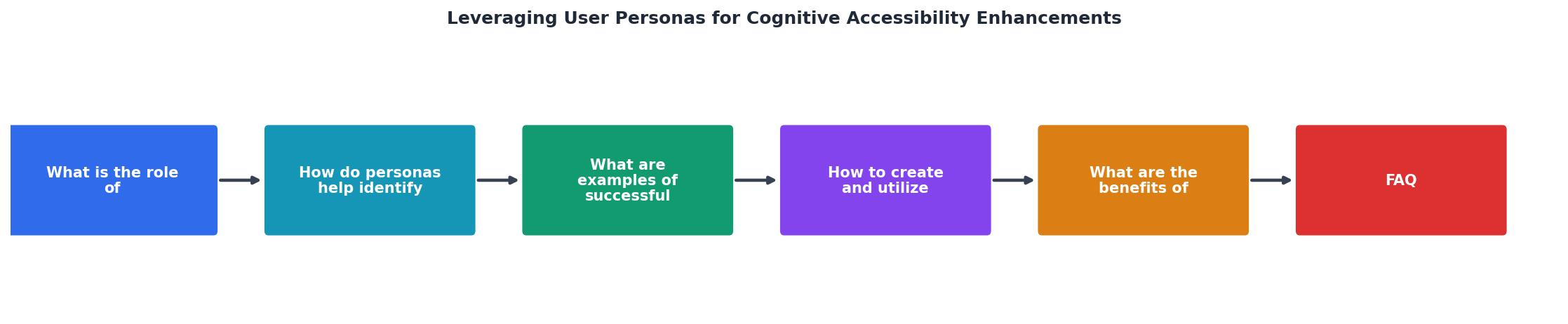
The process follows these steps: Research cognitive profiles, Draft persona documents, Map to WCAG criteria, Walkthrough key flows, Document findings, and Iterate based on testing. Each step produces artifacts that feed into your compliance documentation.
Persona-driven design in practice
Here is a concrete example of how a persona changes a design decision. Imagine an insurance company's claims portal. The original flow requires users to:
- Log in
- Select "File a Claim" from a dropdown menu with 12 options
- Fill out a 4-page form
- Upload documents
- Review and submit
The persona-driven redesign:
- Log in (with persistent "remember me" and clear session timeout warnings)
- A single prominent "File a Claim" button on the dashboard (no dropdown)
- A single-page form with progress saved automatically
- "Add photos or files" with drag-and-drop and a camera option
- A summary that shows all entered data before submission
The following interactive card illustrates how a single persona can map to multiple WCAG criteria and design changes:
Example Persona: Maria, 72
Compliance benefits of personas
For organizations subject to ADA, Section 508, EN 301 549, or the European Accessibility Act, cognitive accessibility personas serve a specific compliance function: they demonstrate due diligence in addressing cognitive barriers.
Regulators increasingly expect more than automated scan results. The European Accessibility Act, which applies from June 2025, explicitly covers cognitive accessibility. A documented persona-driven review process shows:
- You identified cognitive user groups relevant to your product
- You evaluated your interface against their specific needs
- You made design changes based on findings
- You can repeat this process for future updates
Tools like PagePerson Insights can accelerate this process by identifying cognitive barriers across pages automatically, giving your persona-driven reviews a data-backed starting point rather than relying solely on manual walkthroughs.
Cognitive Accessibility Persona Checklist
Your progress is saved automatically in your browser.
FAQ
Frequently Asked Questions
Additional Resources
- Sample Personas for Users With Disabilities - Developing multiple and diverse personas helps identify the varying needs and expectations of different user types by understanding how individuals utilize ...
- Build Accessibility Personas: A Framework for Product Teams - A step-by-step playbook for building, validating, and operationalizing accessibility personas across product, UX, and SEO.
- Creating accessibility personas - Accessibility means that people with a wide range of hearing, movement, sight, and cognitive abilities are able to access your products and services.