Integrating Cognitive Accessibility into Compliance Audits
Most accessibility audits check contrast ratios, alt text, and keyboard navigation. They skip the part where a real person reads your content and has no idea what to do next. Cognitive accessibility covers that gap, and compliance frameworks are catching up fast. This guide walks through exactly how to fold cognitive accessibility checks into your existing audit workflow so your evaluations actually reflect how people think, not just how screen readers parse HTML.

Most accessibility audits check contrast ratios, alt text, and keyboard navigation. They skip the part where a real person reads your content and has no idea what to do next. Cognitive accessibility covers that gap, and compliance frameworks are catching up fast. This guide walks through exactly how to fold cognitive accessibility checks into your existing audit workflow so your evaluations actually reflect how people think, not just how screen readers parse HTML.

- Cognitive accessibility audits evaluate whether users can understand, navigate, and act on content, not just perceive it.
- Integration requires adding cognitive barrier evaluation criteria, selecting the right assessment tools, and documenting findings in a format regulators accept.
- These steps close the biggest gap in most compliance programs and reduce legal exposure under the European Accessibility Act, ADA, and Section 508.
Why cognitive accessibility belongs in audits
Standard WCAG audits cover Perceivable, Operable, Understandable, and Robust. In practice, most audit teams spend 90% of their time on the first two. The "Understandable" principle gets a surface-level check at best. That leaves cognitive barriers completely unaddressed in the final report.
"Around 1 in 5 people in the UK are disabled or neurodivergent.">, Website Accessibility Audits
That statistic alone justifies expanding audit scope. People with ADHD, dyslexia, anxiety disorders, autism, and age-related cognitive decline interact with your digital products daily. When your audit ignores cognitive load, unclear navigation, ambiguous form labels, and dense paragraph blocks, it misses barriers that affect a significant portion of your user base.
From a compliance perspective, the European Accessibility Act (EAA) took effect in June 2025. It explicitly references cognitive accessibility requirements. WCAG 2.2 added success criteria like 3.3.7 (Redundant Entry) and 3.2.6 (Consistent Help) that directly target cognitive ease. Section 508 in the US references WCAG 2.0 Level AA, but enforcement actions increasingly cite cognitive barriers in complaints. Ignoring this area creates measurable legal risk.
The gap between what regulations expect and what audits actually cover is wide. Closing it starts with a structured approach.
How to evaluate cognitive barriers

Evaluating cognitive barriers requires a different lens than checking color contrast or ARIA labels. You are assessing whether a person under cognitive load can complete a task without confusion, frustration, or abandonment.
Here is a structured process that fits inside an existing audit workflow:
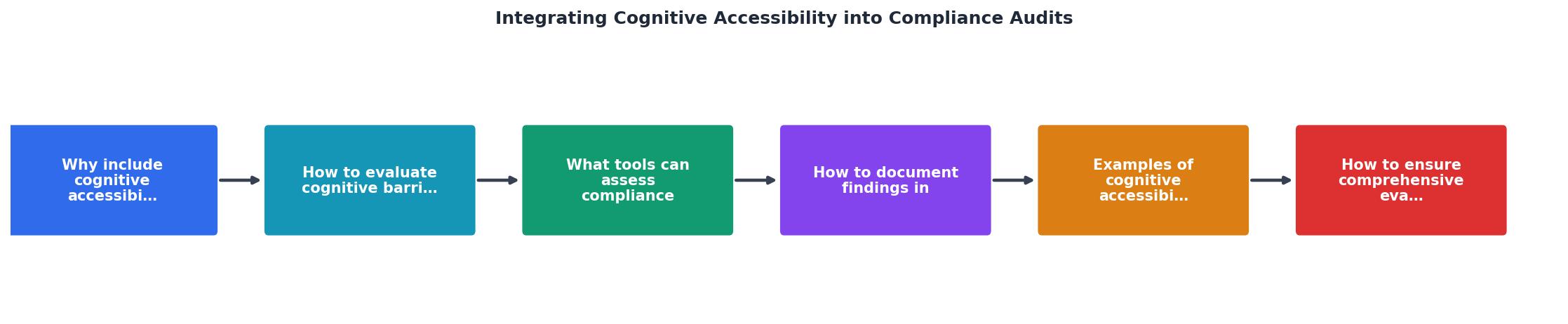
Follow these steps during each page or flow evaluation:
- Identify critical user tasks on the page. For a healthcare portal, that might be "schedule an appointment." For a banking site, "transfer funds." Focus on the top 3-5 tasks.
- Assess reading level. Run the page content through a readability scorer. Aim for a Grade 8 reading level or lower for public-facing content. Government and healthcare sites should target Grade 6.
- Check navigation predictability. Does the menu structure stay consistent across pages? Are breadcrumbs present? Can a user who loses their place recover without starting over?
- Evaluate form complexity. Count the number of fields, check for inline validation, look for clear error messages that explain what went wrong and how to fix it.
- Review information density. Flag pages with walls of text, no headings, no bullet points, or paragraphs exceeding 5 sentences.
- Test timeout behavior. If sessions expire, does the user get a warning? Can they extend the session? Lost form data is a cognitive accessibility failure.
- Verify consistent help access. WCAG 2.2 SC 3.2.6 requires that help mechanisms appear in the same relative location across pages.
Tools for cognitive assessment
No single tool covers every cognitive accessibility criterion. A practical audit toolkit combines automated scanners with manual evaluation methods.
Automated tools:- axe DevTools by Deque catches some cognitive-related WCAG 2.2 failures (error identification, labels, consistent navigation). It does not assess reading level or information density.
- WAVE by WebAIM flags missing form labels, empty links, and structural issues that create cognitive confusion.
- Hemingway Editor or Readable.com score content readability. Paste page text in and get a grade level instantly.
- PagePerson Insights analyzes pages specifically for cognitive accessibility and conversion barriers, identifying where visitors with ADHD, anxiety, dyslexia, or low digital literacy struggle. It fits directly into an audit workflow because it produces findings you can drop into compliance reports.
- Cognitive walkthrough with task scenarios. Define a user goal, then step through the interface noting every decision point where confusion could occur.
- Plain language review against established guidelines (e.g., plainlanguage.gov criteria for US federal content).
- User testing with neurodivergent participants. This is the gold standard. Even 3-5 participants reveal patterns that no automated tool catches.
| Automated Tools Catch | Manual Review Required |
|---|---|
| Missing form labels | Confusing label wording |
| Structural heading gaps | Illogical content flow |
| Missing error messages | Unhelpful error text |
| Inconsistent navigation elements | Unpredictable interaction patterns |
| Color contrast failures | Overwhelming visual density |
| Missing alt text | Alt text that adds confusion |
Documenting audit findings

Documentation is where cognitive accessibility audits often fall apart. The barrier exists, the auditor noticed it, but the report says something vague like "content may be difficult to understand." That gives developers nothing to act on and gives regulators no confidence in your process.
Every cognitive accessibility finding should include these five elements:
- WCAG criterion or standard reference. Map the finding to a specific success criterion (e.g., SC 3.1.5 Reading Level, SC 3.3.3 Error Suggestion) or to a recognized guideline like COGA (Cognitive and Learning Disabilities Accessibility) task force recommendations.
- Severity rating. Use the same scale as your other audit findings. A form that loses all user input on a validation error is critical. A paragraph at Grade 12 reading level on an informational page is moderate.
- Affected user groups. Specify which cognitive profiles are impacted: users with dyslexia, ADHD, anxiety, low digital literacy, age-related cognitive decline, or learning disabilities.
- Evidence. Screenshots, readability scores, task completion data, or specific text excerpts. Concrete evidence makes findings defensible.
- Remediation guidance. Specific, actionable steps. Not "simplify the content" but "rewrite the error message on the payment form from 'Transaction could not be processed due to insufficient parameters' to 'Your payment did not go through. Please check your card number and try again.'"
Here is an example dashboard showing how cognitive accessibility findings might break down in a typical audit of a mid-size organization's public-facing site:
Example: Cognitive Accessibility Audit Summary
Real-world audit examples
Cognitive accessibility audits look different across industries. Here are three concrete scenarios:
Healthcare patient portal. A regional hospital audited its appointment scheduling flow. The audit found that error messages used medical billing codes ("Error: CPT mismatch") instead of plain language. Form timeouts deleted patient-entered data after 2 minutes with no warning. The remediation replaced error codes with human-readable messages and extended session timeouts to 20 minutes with a 60-second warning.
Government benefits application. A state agency audited its online benefits application. The 14-page form had no progress indicator, no save-and-return option, and required users to recall their case number from a previous page. The audit mapped these to WCAG SC 3.3.7 (Redundant Entry) and COGA guidance on memory dependence. Fixes included adding a progress bar, auto-saving form state, and pre-filling previously entered information.
E-commerce checkout. A retail company audited its checkout flow after noticing a 68% cart abandonment rate. The cognitive accessibility audit revealed that the shipping options page displayed 11 choices with nearly identical descriptions, the coupon field triggered a full-page reload on invalid codes (losing the user's place), and the order summary used abbreviations like "Qty" and "Est. dlvry" without explanation. Simplifying to 3 shipping tiers, adding inline coupon validation, and spelling out all terms reduced abandonment by 23%.
Ensuring comprehensive evaluations
Thoroughness separates a checkbox audit from one that actually protects your organization. These practices make the difference:
- Audit across user journeys, not just pages. A single page might pass every check, but the journey from landing page to form submission to confirmation might create cognitive overload through accumulated complexity.
- Include mobile and low-bandwidth scenarios. Cognitive load increases on small screens. Content that works on desktop can overwhelm on mobile.
- Re-audit after remediation. Fixes sometimes introduce new cognitive barriers. A simplified form might remove helpful context. Always verify.
- Maintain a cognitive accessibility baseline. Track scores over time. A readability score that creeps from Grade 8 to Grade 11 over six months of content updates signals a process problem, not just a page problem.
- Cross-reference with analytics. Pages with high bounce rates, low task completion, or frequent back-button usage often have cognitive barriers. Use this data to prioritize audit scope.
Cognitive Accessibility Audit Integration Checklist
Your progress is saved automatically in your browser.
FAQ
Frequently Asked Questions
Additional Resources
- Website Accessibility Audits | WCAG & Cognitive Access - Website accessibility audits covering WCAG 2.2, cognitive accessibility, assistive technology testing and prioritised remediation guidance.
- Why WCAG Compliance Doesn't Always Translate Into ... - WCAG already covers cognitive accessibility, but most audits only confirm criteria exist. Learn why that gap matters and how to close it.
- Cognitive Accessibility Audits | COGAI® - Cognitive accessibility audits focus on real-world interaction under pressure, identifying where users lose understanding, confidence, or direction. What a ...
Need Help with Accessibility?
Improve your site's accessibility and conversion rates with our AI-powered analysis.
Get Started